What is DKIM and How Does It Work? (Beginner-Friendly Guide + Setup & Troubleshooting)
What is DKIM in Email?
DKIM (DomainKeys Identified Mail) is an email authentication method that adds a hidden digital signature to every message you send. Think of it like sealing a letter with a unique stamp linked to your domain. When your email arrives, the receiving server checks that stamp to confirm two things:
- The sender is legitimate: It verifies the email was sent by an authorized source for your domain, not a spoofed sender.
- The message is unchanged: It ensures the content wasn’t modified while traveling across the internet. Without this signature, your emails are more likely to be flagged as suspicious or sent to the spam folder.
How Does DKIM Work? (Step-by-Step)
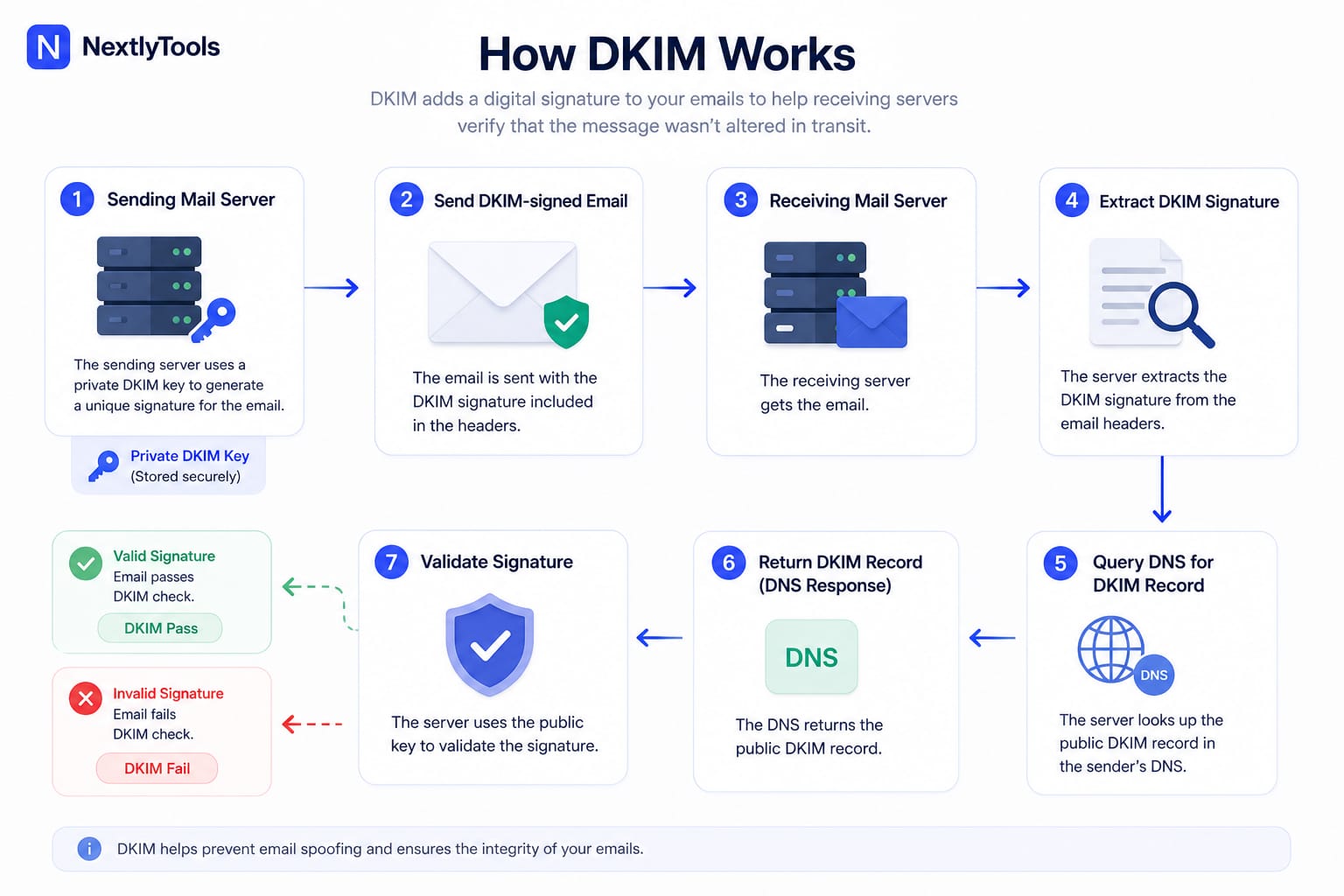
1. The sending server signs the email
When you send an email, your mail server creates a digital signature using a private key.
2. The email is sent
The message travels across the internet with the DKIM signature attached. This signature is added to the email headers.
3. The receiving server gets the email
The recipient’s mail server receives the email and prepares to verify it.
4. The server extracts the DKIM signature
It reads the hidden DKIM signature inside the email headers.
5. The server checks the sender’s DNS
The receiving server queries the sender’s domain DNS to find the public DKIM key.
6. DNS returns the public key
The domain’s DNS responds with the public key stored in a DKIM record.
7. The signature is verified
The receiving server uses the public key to check the signature:
- If it matches → the email is authentic
- If it doesn’t → the email may be altered or fake
This image explains the DKIM authentication process.
DKIM Record Structure Explained
To the untrained eye, a DKIM record looks like a wall of random text. However, it follows a very strict structure. Understanding this format is essential for troubleshooting "DKIM Fail" errors.
A Standard DKIM Record Example
When you look up a DKIM record in a DNS tool , it typically looks like this:
v=DKIM1; k=rsa; p=MIIBIjANBgkqhkiG9w0BAQEFAAOCAQ8AMIIBCgKCAQEA75...Breaking Down the Components (Tags)
DKIM records use "tags" to communicate with the receiving server. Here are the most important ones you need to know:
- v=DKIM1 (Version): This is the mandatory starting tag. It tells the server, "This is a DKIM record."
- k=rsa (Key Type): This specifies the encryption algorithm. While RSA is the most common, some modern setups use Ed25519.
- p= (Public Key): This is the "Public" half of your security key. It is a long string of Base64 encoded data that the receiving server uses to verify your email signature.
Understanding the "Selector" and "Host" Format
This is where most beginners get stuck. A DKIM record isn't just added to your root domain (like example.com). It uses a Selector.