SPF Permerror: What It Means, What Causes It, and How to Fix It
SPF permerror explained: what it means, why it happens, and how to fix it quickly to restore email deliverability and avoid SPF configuration errors.
Quick Fix Summary
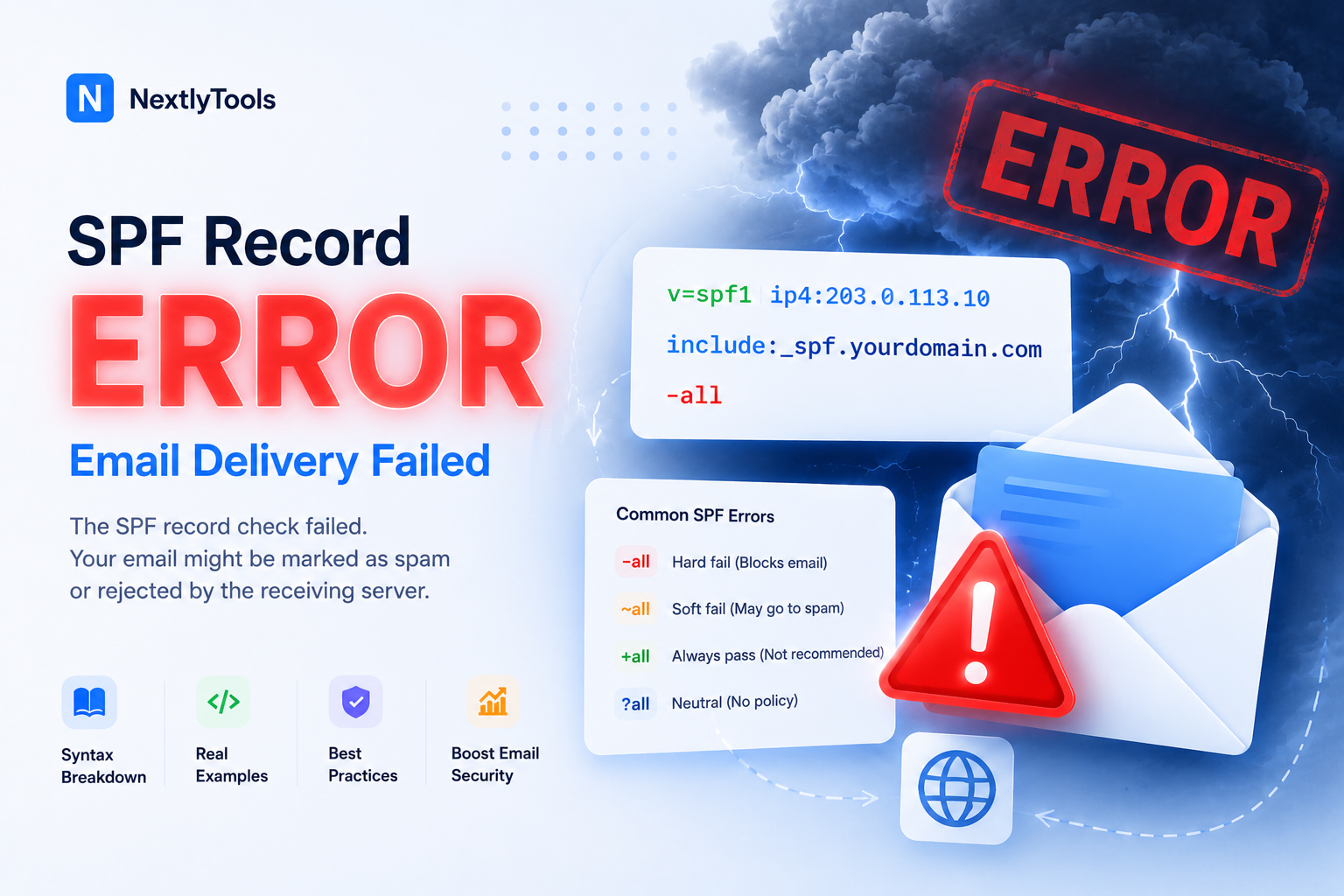
SPF permerror is almost always caused by one of these three things:
- Too many DNS lookups — SPF allows a maximum of 10. Fix: reduce or replace
include:records, or flatten SPF to stay under the limit.- Multiple SPF TXT records — your domain must have exactly one
v=spf1record. Two records = permerror, no exceptions. Fix: merge them into one.- Syntax error — a typo, malformed IP, or missing
v=spf1tag breaks the entire record. Fix: validate with an SPF checker before publishing.
💡 This is the #1 cause of SPF permerror in real-world email systems like Google Workspace and Microsoft 365.
Not sure which applies to you? Run your domain through our free SPF checker — it tells you exactly what's wrong in seconds.
What Is SPF Permerror?
If you see Received-SPF: permerror in your email headers, your SPF record is broken. This means the receiving server could not evaluate your SPF configuration at all.
SPF permerror meaning: a permanent failure in SPF record evaluation caused by DNS or syntax issues. The server stops evaluation immediately due to a fatal SPF configuration error — it does not fall back to a softer result.
This is different from an SPF fail, which means the record was read correctly but the sending IP wasn't listed as authorized. A permerror means evaluation never completed.
Unlike temperror (a transient DNS timeout that often resolves on its own), a permerror requires a deliberate configuration fix.
New to SPF? Start here first: SPF Record Explained — Beginner's Guide (2026)
Need to understand SPF structure? SPF Record Syntax Explained
SPF Permerror vs. Other SPF Results
This table helps distinguish SPF permerror from normal SPF results:
pass Sending server is authorized — deliver normally
fail Sending server is NOT authorized — should be rejected
softfail Probably not authorized — accept but flag
neutral No policy defined
none No SPF record found on the domain
permerror Permanent configuration error — record can't be evaluated
temperror Temporary DNS failure — may resolve on retry
permerror is the only result that means the record itself is malformed or misconfigured. Every other result assumes the record was successfully read.
What Causes SPF Permerror?
1. Exceeding the 10 DNS Lookup Limit
SPF allows a maximum of 10 DNS lookups per evaluation. Exceeding this limit causes permerror immediately.
Every include:, a, mx, ptr, and redirect= counts toward this ceiling — including sub-lookups triggered inside referenced records. A single include:sendgrid.net may cost 2–3 lookups on its own.
Example record that likely exceeds the limit:
v=spf1 include:sendgrid.net include:servers.mcsv.net include:_spf.google.com include:spf.protection.outlook.com include:amazonses.com include:spf.mandrillapp.com ~allFix: Replace include: statements with raw ip4: addresses. ip4: and ip6: cost zero lookups.
💡 This is the most common SPF evaluation failure in Google Workspace and Microsoft 365 setups.
2. Invalid SPF Syntax
Even a single typo invalidates the entire SPF record. Common culprits:
- Missing
v=spf1at the start - Invalid IP format — e.g.,
ip4:192.168.1instead ofip4:192.168.1.0/24 - Typo in a mechanism name — e.g.,
incldue:instead ofinclude: - Extra spaces or invalid characters
Broken:
v=spf1 include:_spf.google.com ip4:192.168.1 ~allFixed:
v=spf1 include:_spf.google.com ip4:192.168.1.0/24 ~allFor a full reference of valid mechanisms and notation, see the SPF Record Syntax Guide.
3. Multiple SPF TXT Records on One Domain
RFC 7208 is unambiguous: one domain, one SPF record. The moment a receiving server finds two v=spf1 TXT records, it stops and returns permerror — it won't merge them or guess which one applies.
This is one of the most overlooked SPF misconfigurations in real-world DNS setups.
Wrong:
TXT  @  "v=spf1 include:sendgrid.net ~all"
TXT  @  "v=spf1 include:_spf.google.com ~all"
Correct:
TXT @ "v=spf1 include:sendgrid.net include:_spf.google.com ~all"It happens more than you'd think: a hosting provider auto-creates an SPF record, then you add another for a new mail service without removing the first.
4. Invalid or Missing Domain in include:
If the included domain has no SPF record, evaluation fails and triggers permerror.
v=spf1 include:nonexistentdomain.xyz ~allBefore adding any include:, verify the target domain has a published SPF record. A quick DNS TXT lookup confirms it.
5. Circular References
If domain A includes domain B and domain B includes domain A, this creates an infinite lookup loop that SPF evaluators automatically reject with permerror. Rare, but it happens in complex multi-domain setups.
How Do I Know I Have SPF Permerror?
SPF permerror is silent on the sender's side — you won't see an error in your inbox or get a bounce notification. Here are the four ways it actually surfaces.
1. You See It in Email Headers
This is the most direct signal. Open a suspicious email that may have failed, then view the raw headers:
- Gmail: Open email → three dots (⋮) → Show original
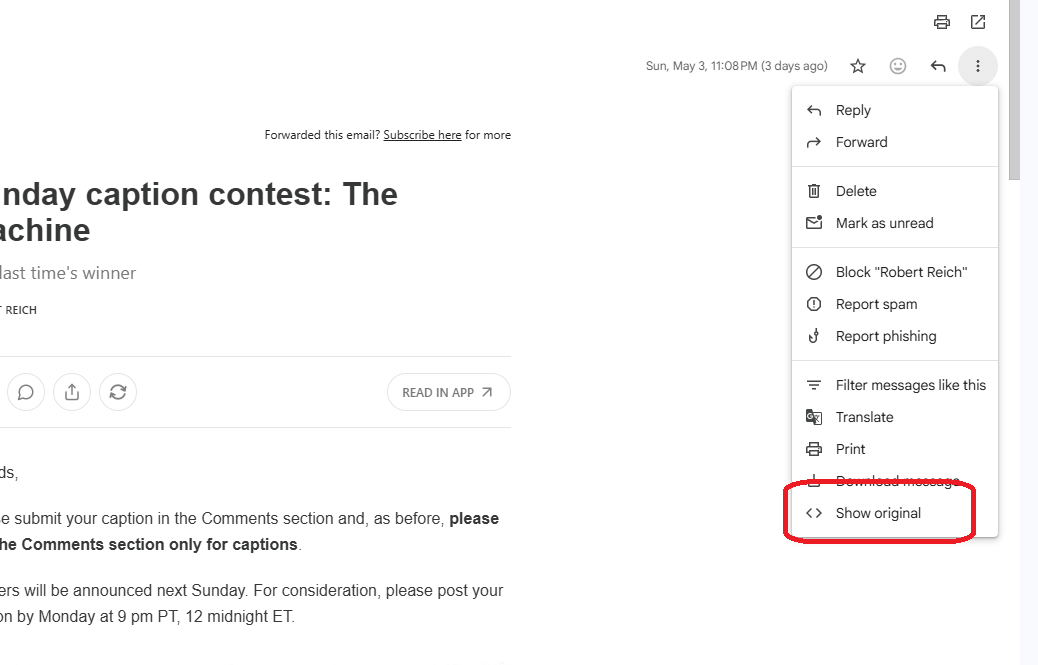
Look for this line:
SPF: permerror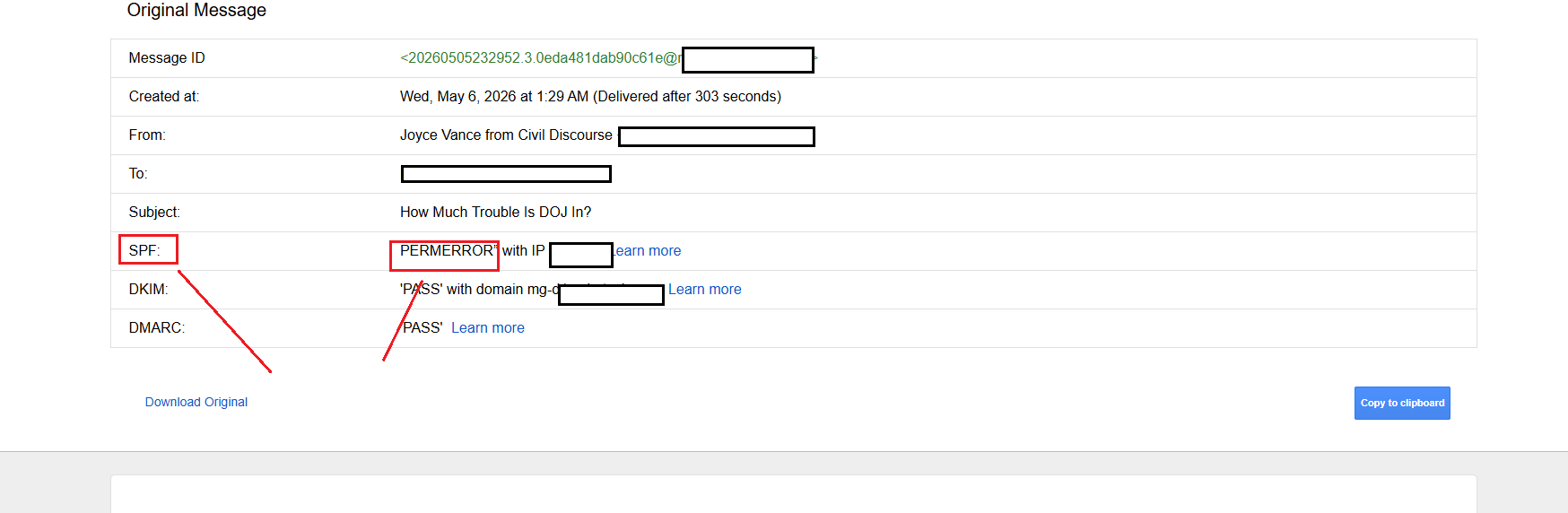
The text in parentheses usually tells you the exact reason — too many DNS lookups, invalid mechanism, multiple records found.
2. Your Emails Land in Spam — With No Bounce
If legitimate emails are silently going to recipients' spam folders and you're not receiving delivery failure notifications, SPF permerror is a common culprit. Unlike a hard fail, permerror doesn't always trigger a bounce — the email arrives, but flagged.
Check a test email to Gmail or Outlook, open the original headers, and look at the Authentication-Results block.
3. A DMARC Report Flags SPF Failures
If you have DMARC set up, your aggregate reports (sent to the email address in your rua= tag) will include SPF disposition results per sending source. A pattern of permerror appearing across multiple recipients' servers is a clear sign your record is broken at the DNS level — not just for one provider.
Tools like dmarcian or Postmark's DMARC analyzer parse these XML reports into readable dashboards.
4. An SPF Checker Tool Reports an Error
You don't have to wait for a failed email. Run your domain proactively:
🔧 Check your domain now with our SPF checker — it will flag permerror causes before they affect your delivery.
If it returns warnings like too many DNS lookups, multiple SPF records detected, or invalid mechanism — that's your permerror in waiting.
How to Diagnose SPF Permerror
Step 1: Read the Email Header
Open a failing email (in Gmail: three dots → Show original). Look for:
Received-SPF: permerror (reason: too many DNS lookups)The reason in parentheses usually names the exact cause — too many DNS lookups, invalid mechanism, etc.
Step 2: Run Your Domain Through an SPF Checker
🔧 Use our SPF Record Checker — it parses your record, counts DNS lookups, and pinpoints syntax errors instantly.
Step 3: Count Your DNS Lookups
include: 1 + sub-lookups
a 1 lookup
mx 1 lookup
ptr 1 lookup — avoid
redirect= 1 lookup
ip4: 0 lookups
ip6: 0 lookups
all 0 lookups
If your total is at or above 10, that's your permerror.
How to Fix SPF Permerror
Fix 1: Flatten Your SPF Record
Replace include: statements with the raw IP addresses they resolve to. This drops lookup count to zero for those senders.
Before:
v=spf1 include:_spf.google.com include:sendgrid.net ~allAfter (flattened):
v=spf1 ip4:209.85.128.0/17 ip4:64.18.0.0/20 ip4:149.72.0.0/15 ip4:167.89.0.0/16 ~all⚠️ Flattening should be used carefully because IP ranges can change over time. Set a quarterly reminder to re-audit, or use an automated flattening service.
Fix 2: Merge Duplicate SPF Records
Delete both records and create one merged record:
v=spf1 include:sendgrid.net include:_spf.google.com ip4:203.0.113.5 ~allAlways verify your DNS using a lookup tool after merging to confirm only one v=spf1 record exists.
Fix 3: Fix Syntax Errors
Run your record through a validator. A valid SPF record always:
- Starts with
v=spf1 - Uses only recognized mechanisms (
ip4:,ip6:,a,mx,include:,exists:,redirect=) - Ends with
~all,-all, or?all
Fix 4: Verify Every include: Target
For each include:domain.com, confirm the target domain has its own published SPF record. This step prevents silent SPF evaluation failures caused by third-party services removing or expiring their SPF records.
How to Merge Multiple SPF Records (Real-World Scenarios)
Here are the most common broken setups and their fixes — side by side.
Scenario 1: Google Workspace + SendGrid
Most common issue: leftover SPF record from a previous email provider, or a new service added as a second record.
Wrong — causes permerror:
TXT  @  "v=spf1 include:_spf.google.com ~all"
TXT  @  "v=spf1 include:sendgrid.net ~all"
Correct — single merged record:
TXT @ "v=spf1 include:_spf.google.com include:sendgrid.net ~all"Scenario 2: Migrating to Office 365 (Old Record Left Behind)
Happens during migration when the old hosting SPF record is not removed.
Wrong — causes permerror:
TXT  @  "v=spf1 include:secureserver.net ~all"
TXT  @  "v=spf1 include:spf.protection.outlook.com ~all"
Correct — single merged record:
TXT @ "v=spf1 include:spf.protection.outlook.com include:secureserver.net ~all"Remove the old host entry entirely if you've fully migrated away.
Scenario 3: Google + Mailchimp + Dedicated Sending IP
Common when teams use multiple marketing apps that each add their own SPF records.
Wrong — causes permerror:
TXT  @  "v=spf1 include:_spf.google.com ~all"
TXT  @  "v=spf1 include:servers.mcsv.net ~all"
TXT  @  "v=spf1 ip4:203.0.113.50 ~all"
Correct — single merged record:
TXT @ "v=spf1 ip4:203.0.113.50 include:_spf.google.com include:servers.mcsv.net ~all"Put ip4: first (zero lookups), then include: statements, then ~all.
Scenario 4: Too Many Providers — Lookup Limit Exceeded
One valid record — but still hitting permerror because the combined DNS lookups exceed 10.
Wrong — causes permerror (lookup limit):
TXT @ "v=spf1 include:_spf.google.com include:sendgrid.net include:amazonses.com include:_spf.hubspot.com include:_spf.salesforce.com ~all"Correct — flatten high-lookup providers:
TXT @ "v=spf1 include:_spf.google.com include:sendgrid.net ip4:199.255.192.0/22 ip4:199.127.232.0/22 ip4:54.240.0.0/18 ~all"Amazon SES and providers with stable IP ranges are flattened to raw ip4:, reducing total lookup count.
The Merge Rule
No matter how many senders you have, the formula is always:
v=spf1 [ip4: addresses first] [include: statements] ~allOne record. One line. No duplicates.
SPF Permerror and Email Deliverability
Most providers do not hard-reject SPF permerror immediately, but it significantly reduces your email trust score.
With a DMARC policy of p=reject and no DKIM fallback, emails can be silently dropped — no bounce, no delivery notification, no trace. That's the worst-case scenario for any email program.
This is why DKIM matters alongside SPF: if SPF fails due to permerror but DKIM passes, DMARC can still authenticate via DKIM alignment. Both together give you a safety net.
Best Practices to Avoid SPF Permerror
- One SPF record per domain — no exceptions
- Stay under 10 DNS lookups — count before publishing, audit quarterly
- Validate before publishing — use a checker, not guesswork
- Use
ip4:for static IPs — zero lookups, always reliable - Avoid
ptr:— slow, unreliable, wastes a lookup - Set up DMARC — gives visibility into SPF failures before they affect delivery
FAQ
What is SPF permerror? A permanent SPF evaluation failure triggered when the receiving server cannot process your SPF record at all — most commonly due to too many DNS lookups, a syntax error, or duplicate records. It will not resolve without a configuration fix.
What causes SPF permerror?
The four main causes: exceeding the 10 DNS lookup limit, a syntax error in the record, having multiple v=spf1 TXT records on the same domain, and referencing an include: domain that has no SPF record.
How do I fix SPF permerror?
Identify the cause first using an SPF checker. For excess lookups: flatten include: to raw ip4: addresses. For duplicate records: merge into one. For syntax errors: validate and correct before republishing.
Is SPF permerror permanent? Permanent describes the error type — a DNS configuration failure that won't self-resolve (unlike a DNS timeout). Once you fix the root cause and DNS propagates, the evaluation failure stops.
How many DNS lookups are allowed in SPF?
Exactly 10. include:, a, mx, ptr, and redirect= all count, including sub-lookups inside referenced records. ip4: and ip6: are lookup-free.
Does SPF permerror cause emails to be rejected? Not always immediately — but it significantly harms deliverability scores. With a strict DMARC policy and no DKIM fallback, emails can be silently dropped. Setting up DKIM prevents this.
SPF Permerror Diagnostic Checklist
- Only one SPF TXT record exists for the domain
- Total DNS lookup count is 10 or fewer
- Record starts with
v=spf1 - All IPs use valid CIDR notation (
ip4:x.x.x.x/xx) - All
include:targets have their own published SPF record - No circular references between domains
- Record ends with
~allor-all - Validated with an SPF checker tool before publishing
Conclusion
SPF permerror is not a deliverability issue — it is a configuration failure that prevents SPF evaluation entirely. Your emails don't just get flagged; the authentication layer breaks down completely before any decision is made.
The fix is always one of three things: reduce DNS lookups, remove duplicate records, or correct a syntax error. All are solvable in under 30 minutes with the right tool.
🔧 Start here: Run your domain through our SPF Record Checker and get a clear diagnosis in seconds.
Once SPF is clean, complete your authentication stack with DKIM — because SPF alone is never enough.
Related: SPF Record Syntax Explained · What Is DKIM and How Does It Work?