DKIM Signature Explained: What It Is and How It Works
Learn what a DKIM signature is, where it appears in your email, and how it works to protect your domain from spoofing and keep your emails out of spam.
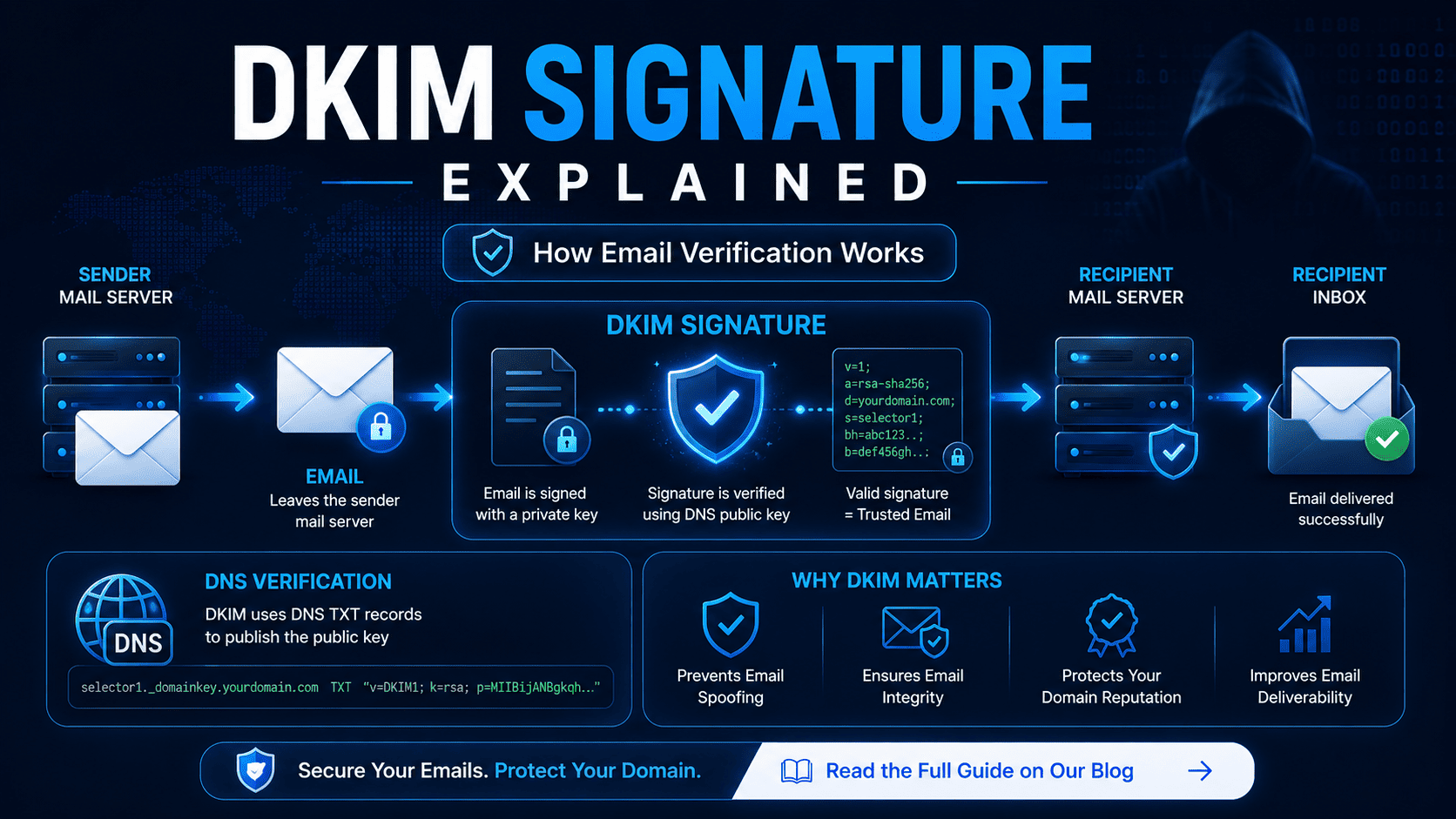
A DKIM signature is an email authentication method that helps verify an email was sent from an authorized server and was not modified in transit. It improves email deliverability, prevents spoofing, and works alongside SPF and DMARC.
What Is a DKIM Signature?
A DKIM signature is a digital stamp added to an email header when the email is sent.
It tells the receiving mail server two things:
- The email came from a real, trusted server
- The email was not changed after it was sent
DKIM stands for DomainKeys Identified Mail.
How Does a DKIM Signature Work?
DKIM uses two keys that work together:
| Key | Where It Lives | What It Does |
|---|---|---|
| Private key | On your mail server | Signs outgoing emails |
| Public key | In your DNS records | Used to verify the signature |
When you send an email, your mail server adds a DKIM signature using the private key. When the email arrives, the receiving server looks up your public key in DNS and checks if the signature is valid.
If the signature matches → the email passes DKIM.
The public key is stored as a TXT record in your DNS. You can check it anytime using our DKIM Lookup Tool or run a full DNS Records Check to see all your domain's records at once.
Where Is the DKIM Signature in an Email?
The DKIM signature is hidden inside the email headers. You do not see it in the email body.
To find it in Gmail: open the email → click the three dots (⋮) → select "Show original".
Here is a real example of a DKIM signature header:
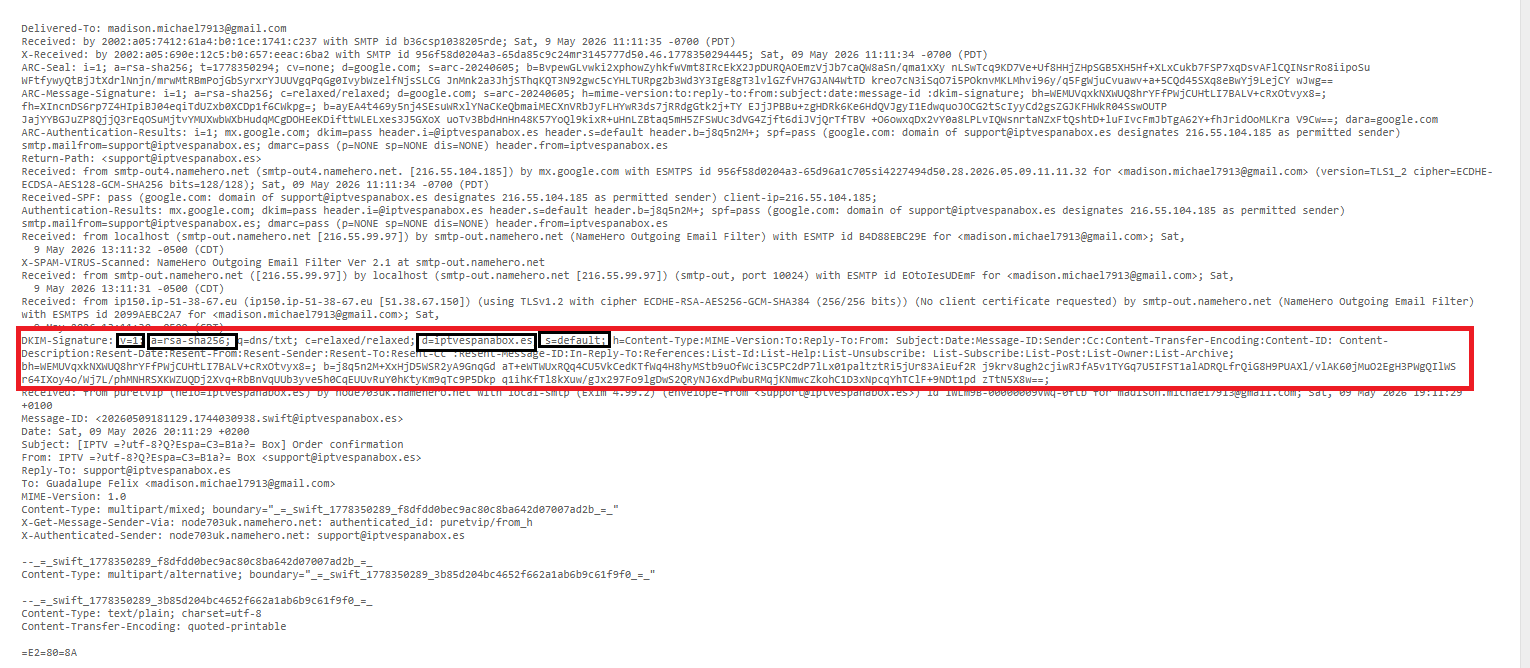
The highlighted line starts with DKIM-Signature: and contains several parameters. Here are the ones every email marketer should know:
| Parameter | What It Means | Why It Matters |
|---|---|---|
v=1 |
Version of DKIM | Always 1 — confirms DKIM is in use |
a=rsa-sha256 |
Signing algorithm | The method used to create the signature — rsa-sha256 is the standard |
d=yourdomain.com |
Signing domain | Must match your From address domain for DMARC alignment |
s=default |
Selector | Points to the DNS record where your public key lives |
c=relaxed/relaxed |
Canonicalization | How the email is prepared before signing — relaxed allows minor changes |
bh= |
Body hash | A fingerprint of the email body — if this changes, DKIM fails |
b= |
The signature | The actual cryptographic signature — verified against your DNS public key |
Important DKIM Tags to Check
d=must match your From domain — if you send fromsupport@yourbrand.com, thed=value must beyourbrand.com. If it does not match, DMARC will fail even if DKIM passes.s=is your selector — if you use multiple email tools (e.g. Mailchimp + your own server), each one needs its own selector.bh=failing means the body was changed — this happens when an email relay, forwarder, or ESP adds content after the email was signed. This is one of the most common DKIM failures.c=relaxed/relaxedis recommended — it allows minor whitespace changes without breaking the signature, which is important when emails pass through multiple servers.
What Does "DKIM Signature Not Verified" Mean?
This error means the signature check failed. Common reasons:
- The DNS public key is missing or wrong
- The email was changed after being sent (by a mail relay or forwarding)
- The private key and public key do not match
- The DKIM record was not set up correctly
To check if your DNS public key is in place, use our TXT Record Lookup — DKIM keys are published as TXT records under your domain.
What Does "DKIM Signature Body Hash Not Verified" Mean?
This means the email body was changed after the DKIM signature was added.
This often happens when:
- A mail server adds a footer to the email
- Email forwarding rewrites the message
- A mailing tool modifies the body before delivery
Is a DKIM Signature the Same as SPF or DMARC?
No. They are three different email security tools that work together:
- SPF — checks if the sending server is allowed to send for the domain
- DKIM — checks if the email was signed and not changed
- DMARC — uses SPF and DKIM results to decide what to do with failing emails
Using all three gives your domain the best email security.
You can check each one with our free tools:
- SPF Lookup — verify your SPF record is set correctly
- DMARC Lookup — check your DMARC policy
- DKIM Lookup — verify your DKIM public key in DNS
Want to understand DMARC better? Read our guides on what DMARC is, DMARC record syntax, and what causes a DMARC fail.
How to Check if Your DKIM Signature Is Valid
You can check your DKIM setup by:
- Using our free DKIM Lookup Tool to look up your public key in DNS
- Looking at the email headers in Gmail → click the three dots → "Show original"
- Running a DNS Records Check to see all records for your domain
If you see dkim=pass in the email headers, your signature is working.
How to Set Up a DKIM Signature
The steps depend on your mail server or email provider, but the general process is:
- Generate a DKIM key pair (private + public)
- Add the public key as a TXT record in your DNS — confirm it was added with our TXT Lookup
- Configure your mail server to sign emails with the private key
- Send a test email and verify the signature passes
Most email platforms like Google Workspace, Office 365, Mailchimp, and SendGrid have guides to help you set this up in a few steps.
Why Does DKIM Matter?
- It improves your email deliverability — emails are less likely to land in spam
- It protects your domain from email spoofing — learn more about how email spoofing works
- It is required for DMARC to work properly — see our guide on what is DMARC
- Gmail and other providers use DKIM results to decide how to handle your emails
Quick Answers
What is a DKIM signature? A digital signature added to email headers that proves the email came from your domain and was not changed.
Where is the DKIM signature located? In the email headers, not the visible email body.
What does DKIM signature not verified mean? The signature check failed — usually because of a missing DNS key or a change made to the email after sending.
Do I need DKIM for my domain? Yes. Without DKIM, your emails are more likely to go to spam and your domain is easier to spoof.
Conclusion
A DKIM signature is one of the most important steps you can take for your domain's email security. It proves your emails are real, protects your domain from spoofing, and works together with SPF and DMARC to give you complete email authentication.
If you have not checked your DKIM setup yet, start with our free DKIM Lookup Tool. You can also run a full DNS Records Check to review all your DNS records — including SPF, DMARC, MX, and TXT — in one place.
Getting DKIM right is a small step that makes a big difference for your email deliverability and domain reputation.
Need to check more DNS records? Use our free tools: MX Lookup · NS Lookup · WHOIS Check · DMARC Lookup