How Email Spoofing Works
Email spoofing is when attackers send emails that appear to come from your address or domain without accessing your account. This beginner-friendly guide explains how spoofing works, why SMTP allows it, and how SPF, DKIM, and DMARC protect your domain from fake emails and phishing attacks
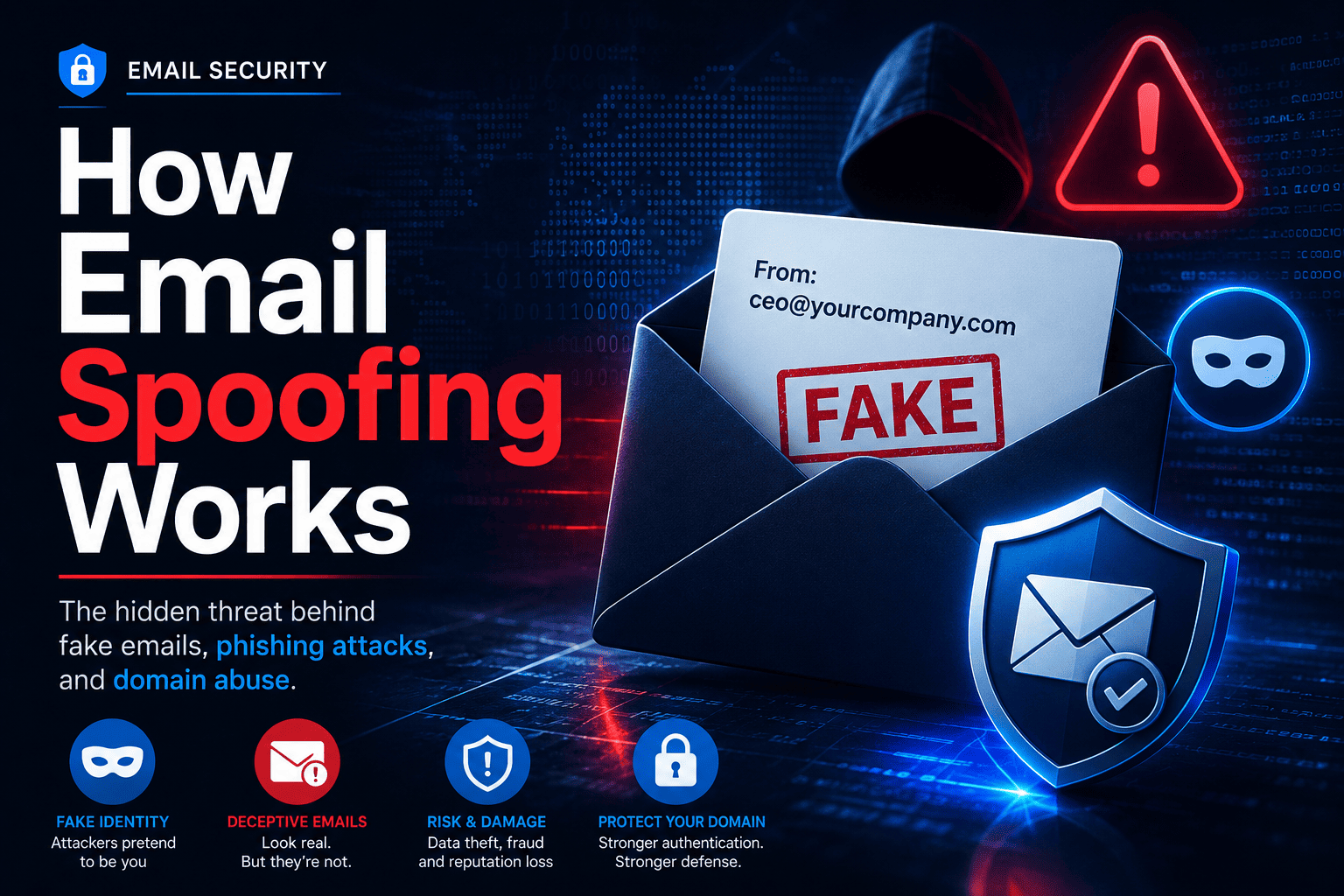
Table of Contents
- What Is Email Spoofing?
- Why Anyone Can Send Email As You
- How Email Spoofing Actually Works
- Real Examples of Email Spoofing
- Is It the Same as Being Hacked?
- Which Domains Get Spoofed Most?
- SPF, DKIM and DMARC Explained
- SPF vs DKIM vs DMARC: Comparison Table
- Email Spoofing vs Phishing
- How to Stop Email Spoofing
- Is My Domain Protected?
- FAQ
What Is Email Spoofing?
Email spoofing is when attackers send emails that appear to come from your address or domain without accessing your account.
It works because the original email system (SMTP) does not verify sender identity by default.
Attackers use spoofing for phishing, scams, fake invoices, and Business Email Compromise (BEC) attacks.
The main protections are SPF, DKIM, and DMARC DNS records.
Why Can Anyone Send Email "As" You?
Here is the uncomfortable truth: email was not built with trust in mind.
When email was invented in the 1970s and 1980s, it was used by universities and research institutions. Everyone using it already knew each other. There was no need to verify who was sending what.
The core protocol that moves email around — called SMTP (Simple Mail Transfer Protocol) — was designed to be simple and open. It does not check whether the person sending an email actually owns the address they are sending from.
Think of it like sending a physical letter. You can write any return address you want on the envelope. The post office will not verify it. Email works the same way, except the envelope is digital and invisible.
How Email Spoofing Actually Works
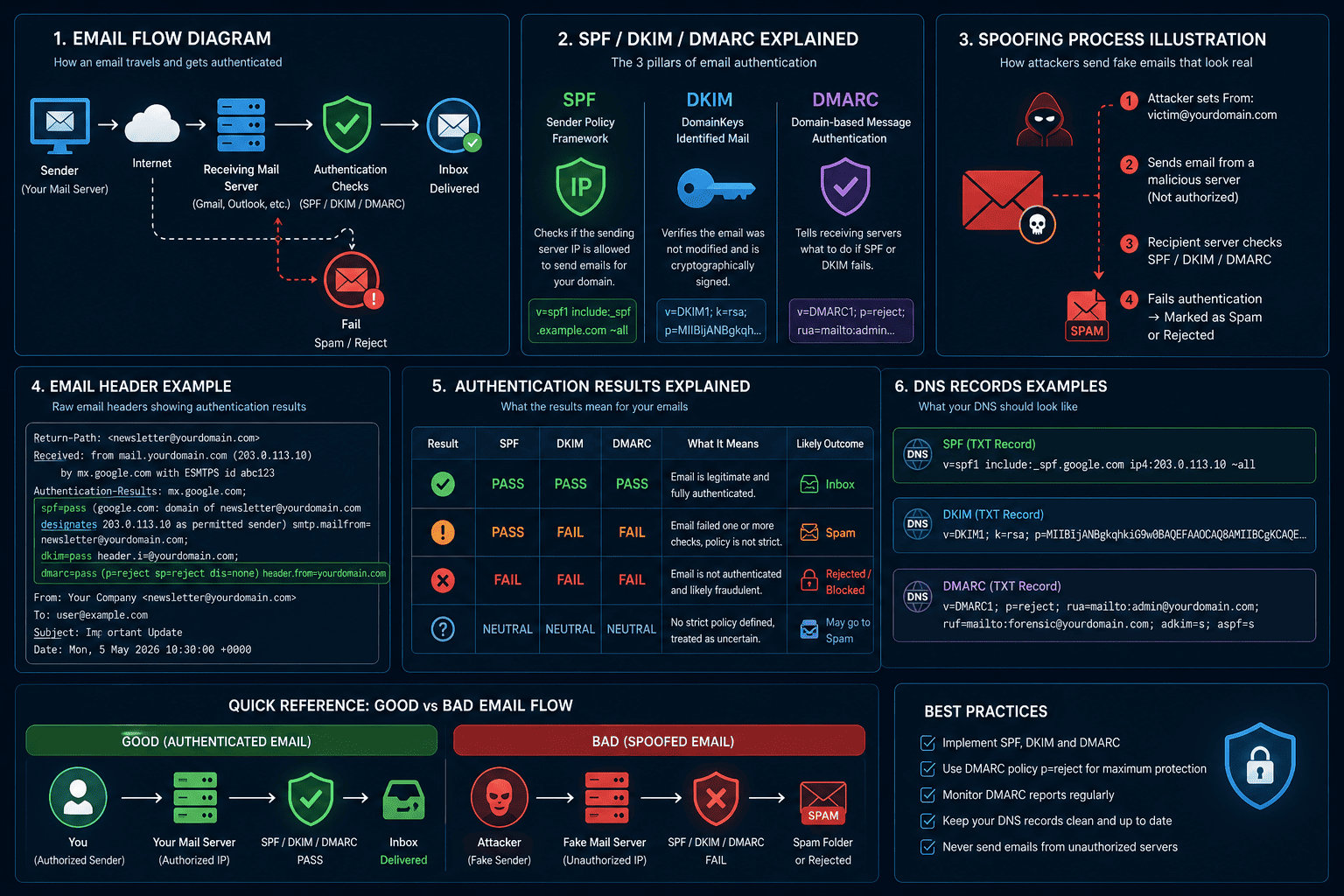
The Envelope From vs the Header From
When you send a normal email, two different "From" fields are involved — and most people never know this.
The Envelope From is the technical return address used behind the scenes to handle bounced emails. You never see this in your inbox.
The Header From is the name and email address displayed to the recipient — the one that reads From: support@yourcompany.com.
The problem: the Header From can say anything. It is just a text label. Email servers historically trusted whatever was written there.
The 5 Steps of a Spoofed Email
- An attacker opens an email program or script on their computer
- They type whatever they want in the "From" field — for example
ceo@yourcompany.com - They send the email through their own server
- The recipient's mail server receives it
- The recipient sees
From: ceo@yourcompany.comand believes it is real
No hacking required. No password needed. No access to your account. Just filling in a text field.
What Spoofed Email Headers Look Like
Here is what the raw headers look like when an email has been spoofed:
From: CEO Name <ceo@yourcompany.com>
Return-Path: <sender@attackerserver.com>
Received: from mail.attackerserver.com (...)
The visible From: shows your CEO. The Return-Path — the real technical sending path — reveals a completely different server with no connection to your company.
To view raw headers yourself: in Gmail, open the email and click the three-dot menu → "Show original." In Outlook, open the email → File → Properties.
Real Examples of Email Spoofing
Example 1: The Fake CEO Email
An attacker spoofs your CEO's email address and sends this to someone in your finance team:
From: David Chen <ceo@yourcompany.com>
Subject: Urgent - wire transfer

Hi Sarah,

I am in an external meeting and cannot call right now.
Please process a wire transfer of $22,000 to the account
below by 3pm today. Very time-sensitive. Do not discuss
with anyone until it is done.

Thanks,
David
The finance employee sees the real CEO name and the real company email address. Nothing looks wrong. They process the transfer. The money is gone.
This type of attack is called Business Email Compromise (BEC) and costs businesses billions of dollars every year. It works because of email spoofing.
Example 2: Spoofed Email From Yourself
Many people have searched "I got an email from my own address that I never sent" — this is also email spoofing. Attackers sometimes send from your own address to bypass spam filters, since your mail client assumes you would not mark yourself as spam. These emails usually contain ransom threats claiming the attacker has embarrassing information about you.
Your account has not been hacked. Your password is fine. The attacker just wrote your own address in their From field.
Example 3: Domain Spoofing
Instead of using your exact address, attackers sometimes register a similar-looking domain. So instead of yourcompany.com they use yourcompany-inc.com or yourcompany.co or yourcompny.com with a typo. This is called domain spoofing and is slightly different, but the goal is the same — making the recipient think the email is from you.
Is Email Spoofing the Same as Being Hacked?
No — and this is one of the biggest areas of confusion.
If your email address is being spoofed, it does not mean:
- Someone knows your password
- Someone is logged into your email account
- Your account has been compromised in any way
The attacker never touches your account. A spoofed email leaves no trace in your Sent folder because it was never sent from your account at all. The attacker sent it from their own server, and simply put your address in the From field.
You usually find out it is happening because:
- A friend or colleague tells you they received a strange email "from you"
- You start getting delivery failure notifications for emails you never sent (the spoofed emails are bouncing back to your address)
- You check your DMARC reports and see unfamiliar servers sending email as your domain
Which Domains Get Spoofed Most Often?
Domains with no authentication records published in DNS are the easiest targets. Attackers often scan for unprotected domains and use those addresses in their scams, because emails from unprotected domains are more likely to land in inboxes.
The domains most at risk are:
- New domains that have not set up any DNS records yet
- Parked domains — domains you registered but do not actively use for email
- Small business domains that never set up email security
- Any domain missing SPF, DKIM, or DMARC records
Check whether your domain currently has protection:
The 3 DNS Records That Stop Email Spoofing
The email industry created three standards to fight spoofing. They all live in DNS — the same system that translates domain names into website addresses. Together they form a complete defence.
1. SPF (Sender Policy Framework)
What it is: A list you publish in DNS of every server allowed to send email for your domain.
How it works: When a server receives an email from yourcompany.com, it checks your SPF record. If the sending server is not on the approved list, the check fails.
The analogy: Think of it like a nightclub guest list. If your name is not on the list, you do not get in. SPF is the guest list for your email domain.
Example SPF record:
v=spf1 include:_spf.google.com -allThis means: "Only Google's servers can send email for my domain. Reject everything else."
Check your SPF: SPF Lookup Tool · Learn more: What Is an SPF Record?
2. DKIM (DomainKeys Identified Mail)
What it is: A digital signature attached to every email your domain sends.
The analogy: Think of it like a wax seal on a letter. If the seal is intact when it arrives, you know it genuinely came from the sender and has not been tampered with.
How it works in 3 steps:
- Your email server signs each outgoing email using a secret private key
- A matching public key is stored in your DNS, visible to anyone who looks
- When the receiving server gets the email, it checks the signature against your public key — if they match, the email is genuine
Why spoofing fails here: An attacker cannot produce a valid DKIM signature for your domain because they do not have your private signing key. The check fails automatically.
Check your DKIM: DKIM Lookup Tool · Learn more: What Is DKIM in Email?
3. DMARC — The Policy and Reporting Layer
What it is: The rule that decides what happens when SPF or DKIM fail — and the system that sends you daily reports.
Why you need it on top of SPF and DKIM: Without DMARC, even if SPF and DKIM both fail, many mail servers will still deliver the email. DMARC fixes that.
The three DMARC policy options:
| Policy | What Happens to a Failing Email |
|---|---|
p=none |
Delivered normally — but logged in your daily reports |
p=quarantine |
Sent to the spam or junk folder |
p=reject |
Blocked completely — never reaches the inbox |
The alignment check: DMARC also verifies that the domain in the visible "From" address — the one your recipient actually sees — matches the domain that passed SPF or DKIM. This is the specific test that directly stops email spoofing of your address.
The reporting: DMARC sends you daily reports showing every server that sent email claiming to be your domain. This is how you find out you are being spoofed, even when your recipients have not told you.
Check your DMARC: DMARC Lookup Tool · Learn more: What Is DMARC? and DMARC Record Syntax Explained
What Happens to a Spoofed Email When Protection Is in Place?
When your domain has DMARC set to p=reject, here is what happens to a spoofed email step by step:
- Attacker sends an email claiming to be from
ceo@yourcompany.com - The receiving mail server checks your SPF record — the attacker's server is not on your approved list, so SPF fails
- The receiving mail server checks for a DKIM signature — the attacker cannot produce one for your domain, so DKIM fails
- DMARC checks the alignment of the From address — both SPF and DKIM failed, so DMARC fails
- Your DMARC policy says
p=reject— the email is blocked and never reaches the inbox - The failure is logged in your daily DMARC report so you can see it happened
The recipient never sees the spoofed email. The attack fails completely.
How to Set Up Email Spoofing Prevention on Your Domain
Here is the recommended order of steps. Do not rush to the last step — getting the first two right takes time and patience.
Step 1 — Publish an SPF record Find out which servers send email for your domain (your email provider, any newsletters, CRMs, etc.), then publish an SPF record listing them. Check: SPF Lookup Tool Guide: What Is an SPF Record?
Step 2 — Set up DKIM Log into your email provider (Google Workspace, Microsoft 365, etc.) and enable DKIM signing. They will give you a TXT record to add to your DNS. Publish it. Check: DKIM Lookup Tool
Step 3 — Publish a DMARC record starting at p=none Start with monitoring only. This way you collect reports without risking any legitimate mail being blocked.
v=DMARC1; p=none; rua=mailto:dmarc@yourdomain.comCheck: DMARC Lookup Tool
Step 4 — Read your DMARC reports for 2 to 4 weeks Your daily reports will show you which servers are sending email as your domain. This is where you find out if there are legitimate services you forgot to add to SPF.
Step 5 — Fix any legitimate senders that are failing If a newsletter tool or CRM shows up as failing, configure DKIM for it inside that platform. Do not move to enforcement until everything legitimate is passing.
Step 6 — Move to p=quarantine, then p=reject Once all your real senders are passing, tighten the policy. Start at quarantine to catch any last surprises, then move to reject for full protection.
If you are seeing DMARC failures and not sure why: DMARC Fail Explained If you hit SPF errors: SPF Permerror Guide
Quick Reference: Is My Domain Protected?
Run through these checks:
| Check | Tool | What You Are Looking For |
|---|---|---|
| Do I have a DMARC record? | DMARC Lookup | A record starting with v=DMARC1 |
| Is my SPF record set up? | SPF Lookup | A TXT record starting with v=spf1 |
| Is DKIM configured? | DKIM Lookup | A valid key for your domain |
| Are all my DNS records visible? | DNS Records Checker | Full overview of all records |
If any of these is missing, your domain can be spoofed right now.
Email Spoofing vs Phishing
These two terms are often used interchangeably, but they are not the same thing.
| Email Spoofing | Phishing | |
|---|---|---|
| What it is | A technical trick — faking the sender address | A social engineering attack — tricking someone into an action |
| Goal | Make an email look like it came from a trusted source | Steal credentials, money, or sensitive data |
| Requires spoofing? | Yes, it is the technique itself | Often uses spoofing, but not always |
| Example | Sending email pretending to be your CEO | Sending a fake login page link to steal your password |
The simple way to remember it:
- Spoofing is the technique — faking who the email is from
- Phishing is the scam — what the attacker is trying to achieve
Spoofing is frequently used inside phishing attacks to make them more convincing. A phishing email pretending to be from your bank is more believable if it shows the bank's real email address in the From field. But spoofing can also be used without any phishing element — for example, sending spam or bypassing spam filters.
Not all spoofed emails are phishing. Not all phishing emails use spoofing. But the two often appear together, which is why understanding both is important.
→ See also: DMARC Fail Explained — the article covering what happens when spoofing attempts bypass authentication.
Frequently Asked Questions
Someone is sending emails from my address. Can I stop them?
Not directly — you cannot force their outgoing mail server to stop. What you can do is publish DMARC with p=reject, which tells receiving mail servers to block those spoofed emails before delivery. The attacker can still send them; they just will not land in anyone's inbox.
Will setting up DMARC break any of my legitimate emails?
It can, if some of your legitimate senders are not yet properly authenticated. That is exactly why you start at p=none and monitor reports first. The reports show you which senders to fix before you turn on enforcement.
My domain is new. Should I set this up immediately? Yes — in fact, a new domain with no email history is a very clean situation to set up protection from the start. It is much easier than fixing an established domain with many senders already in use.
I do not send email from my domain. Do I still need DMARC?
Yes, arguably more so. Domains that do not send email are prime targets for spoofing because there are no legitimate emails to distinguish the fake ones from. A parked domain should have p=reject from day one:
v=DMARC1; p=reject; sp=reject;Can I see who is spoofing me?
Yes, through DMARC aggregate reports. Add a rua= address to your DMARC record and you will receive daily XML reports showing every source that sent email claiming to be your domain — including the IP addresses of attackers.
The Bottom Line
Email spoofing works because the original email protocol never required senders to prove their identity. Anyone can put any address in the From field of an email. That was fine in 1982 when the only people using email were academics. It is a serious problem in 2026 when email is used for banking, business, and personal communication.
The fix exists and it is free. Three DNS records — SPF, DKIM, and DMARC — work together to verify that emails from your domain are actually from you, and to block the ones that are not.
The longer your domain goes without these records, the longer it sits unprotected and available for anyone to impersonate.
Start with these tools today:
Related Articles
- What Is DMARC? Complete Beginner's Guide
- DMARC Record Syntax Explained
- DMARC Fail Explained: Causes and Fixes
- What Is an SPF Record?
- SPF Record Syntax Explained
- SPF Permerror: What It Means and How to Fix It
- What Is DKIM in Email?
- Understanding DNS Records
- All DNS Tools
Last updated: 2026 | Category: Email Security | Reading time: ~10 minutes