DMARC Fail Explained: What It Means and How to Fix It
DMARC fail means an email claiming to come from your domain failed SPF or DKIM alignment checks. Learn the real causes of DMARC failures, how alignment works, common error messages, forwarding problems, and how to fix DMARC issues in Mailchimp, SendGrid, Office 365, and Google Workspace.
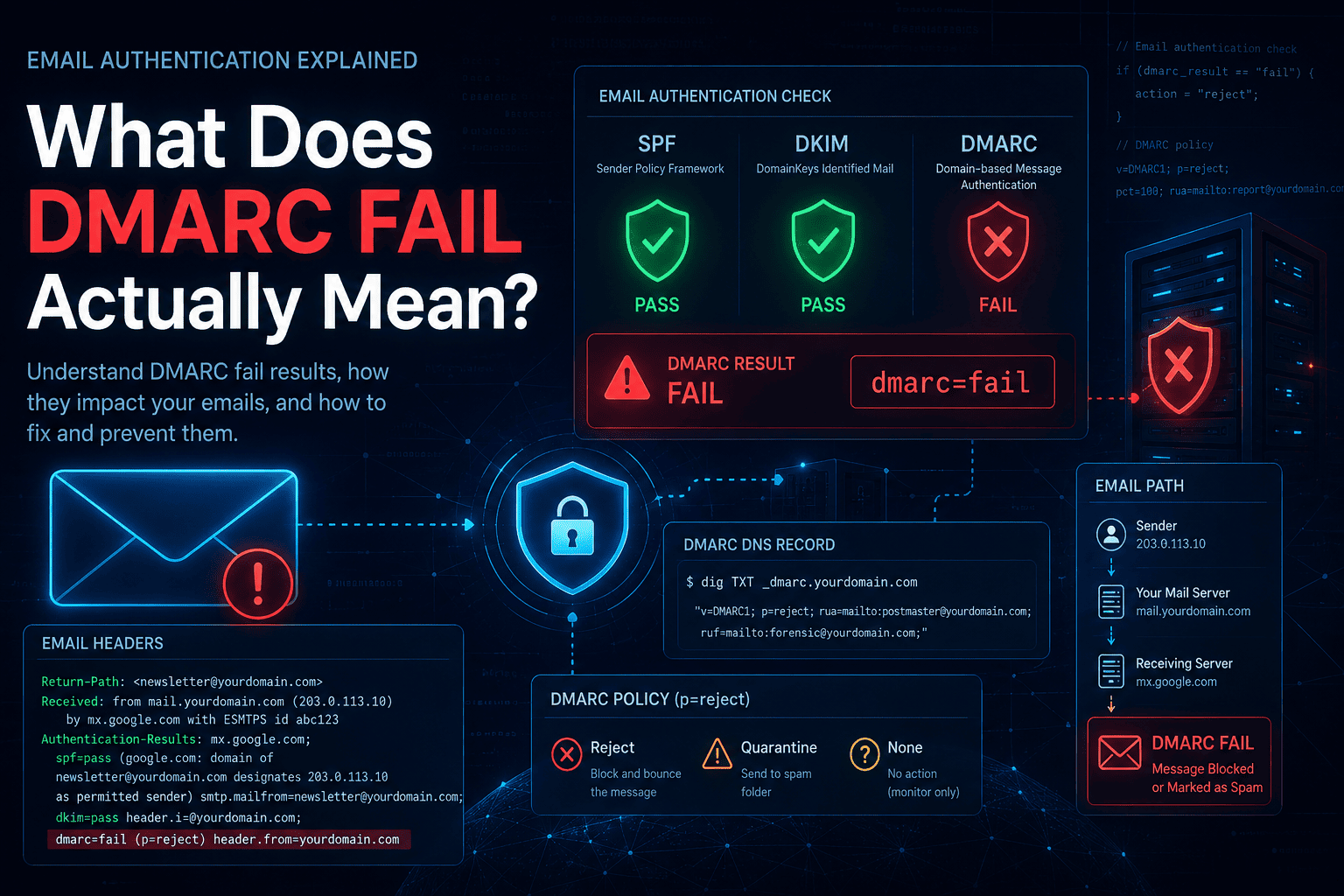
What Does DMARC Fail Actually Mean?
When you see dmarc=fail in an email header or bounce message, it means one thing: an email claimed to come from your domain, and the receiving mail server could not verify that claim.
That is it. DMARC fail does not automatically mean someone is attacking you. It does not mean your email is broken. It means the authentication chain — SPF, DKIM, or both — did not satisfy DMARC's requirements for that message.
What happens next depends on your DMARC policy:
p=none— the email still delivers, the failure is logged in your daily reportsp=quarantine— the email lands in spamp=reject— the email is blocked before reaching the inbox
Before assuming the worst, run a quick check: DMARC Lookup Tool to confirm your record is valid, then SPF Lookup Tool and DKIM Lookup Tool to see what the authentication layer looks like.
Why DMARC Fails Even When SPF or DKIM Pass
DMARC does not just ask "did SPF pass?" or "did DKIM pass?" It asks something more specific: did they pass and does the domain they authenticated match the domain in your From: address?
That second part is alignment — and it is where most legitimate email fails DMARC.
DMARC passes when at least one of these is true:
- SPF passes and the return-path domain matches your From domain
- DKIM passes and the signing domain (
d=) matches your From domain
If neither condition is met, dmarc=fail.
This matters because your email might pass SPF technically — the sending IP is authorised — but the domain it is authorised for is bounce.mailchimp.com, not yourdomain.com. SPF passes, alignment fails, DMARC fails. This confuses a lot of people.
The Four Causes That Cover 95% of Cases
1. SPF Passes But Is Not Aligned
Your SPF record includes the sending service, so SPF passes. But the service uses its own domain in the return-path (for bounce handling), so SPF alignment against your From domain fails.
Who causes this: Mailchimp, SendGrid, HubSpot, ActiveCampaign, almost every email marketing platform. They all use their own bounce domains by default.
What you see in the email headers (open the raw message in Gmail via "Show original", or Outlook via "View message source"):
Authentication-Results: mx.google.com;
  spf=pass (google.com: domain of bounce-12345-user=yourdomain.com@mail.mailchimp.com
            designates 198.2.136.64 as permitted sender)
            smtp.mailfrom=bounce-12345-user=yourdomain.com@mail.mailchimp.com;
  dkim=none (no signature);
  dmarc=fail (p=QUARANTINE sp=QUARANTINE dis=QUARANTINE)
              header.from=yourdomain.com
Notice what is happening: SPF passes — but the smtp.mailfrom domain is mail.mailchimp.com, not yourdomain.com. The header.from is yourdomain.com. Those two domains do not match. SPF alignment fails. There is no DKIM signature at all. Both alignment checks fail → dmarc=fail.
Fix: Configure DKIM for that sender so DMARC can pass via DKIM alignment instead. A single passing aligned check is enough. SPF alignment is not required if DKIM alignment passes.
→ See the platform-specific fix for your sender: Mailchimp DMARC Fail Fix · SendGrid · Office 365 · Google Workspace
2. DKIM Is Not Signed With Your Domain
The third-party sender signs the email with DKIM, but using their own domain — not yours. dkim=pass shows up in the headers, but for crm-provider.com, not yourdomain.com. DKIM alignment fails. SPF is also not aligned. DMARC fails.
What you see in the raw headers:
Authentication-Results: mx.google.com;
  spf=pass (google.com: domain of sender@em.crm-provider.com
            designates 167.89.11.22 as permitted sender)
            smtp.mailfrom=sender@em.crm-provider.com;
  dkim=pass header.i=@crm-provider.com header.s=s1 header.b=Xy7Rqm12;
  dmarc=fail (p=REJECT sp=REJECT dis=NONE)
              header.from=yourdomain.com
Both SPF and DKIM pass — but neither for yourdomain.com. The header.from is your domain. The SPF mailfrom and DKIM header.i both belong to the CRM. No aligned pass → dmarc=fail. This is the exact scenario behind "SPF and DKIM pass but DMARC fails."
And here is what it looks like after fixing DKIM (after publishing your platform's CNAME records):
Authentication-Results: mx.google.com;
  spf=pass smtp.mailfrom=sender@em.crm-provider.com;
  dkim=pass header.i=@yourdomain.com header.s=s1 header.b=Pq9Rst34;
  dmarc=pass (p=REJECT sp=REJECT dis=NONE)
              header.from=yourdomain.com
Same SPF result — still not aligned. But now DKIM signs with @yourdomain.com. One aligned pass is all DMARC needs → dmarc=pass.
Fix: Go into the sending platform and configure domain authentication. Every major platform (Mailchimp, SendGrid, HubSpot, Salesforce) has a setup process where they give you CNAME or TXT records to publish in your DNS. Those records connect their sending infrastructure to your domain's DKIM signature.
Verify the key is published after setup: DKIM Lookup Tool
3. Email Forwarding
This one is mostly not your fault — and it is the one you cannot always fix.
When an email is forwarded, the forwarding server's IP takes over. That IP is not in the original sender's SPF record, so SPF fails. If the forwarder modifies the message body (adding a footer, a disclaimer, a mailing list tag), the DKIM signature breaks too. Both checks fail. DMARC fails.
Classic scenario: A user forwards their @gmail.com inbox to their @company.com address. Google's SPF record does not authorise the forwarding server. DKIM may break if the forwarder touches the message.
What you see in your DMARC aggregate reports: Failures showing up from IP addresses that belong to forwarding services or corporate mail relays.
Realistic fixes:
- If you control the forwarding server, implement ARC (Authenticated Received Chain) — it preserves the original authentication results through the hop
- If you do not control it, this is a known limitation of DMARC. Stay at
p=quarantinerather thanp=rejectif forwarding is a significant part of your email flow
4. "SPF and DKIM Pass But DMARC Fails"
This is the most Googled DMARC confusion — and the answer is alignment.
SPF passed, but for a third-party domain. DKIM passed, but the signing domain doesn't match your From domain. Both technical checks passed, but neither one was aligned to your From address. So DMARC fails.
The fix is not to keep adding things to your SPF record. The fix is to get at least one aligned pass — typically by configuring proper DKIM with your domain through the sending platform.
Read more about how SPF and DKIM interact with alignment: DMARC Record Syntax Explained and What Is DKIM in Email?
Common DMARC Error Messages Decoded
550 5.7.1 Email rejected per DMARC policy
Your email was rejected by the receiving server because it failed DMARC and the sender's domain policy is p=reject. The email never reached the inbox.
If this is happening to mail you are sending: your SPF and DKIM are not properly configured or aligned. Check both: SPF Lookup Tool · DKIM Lookup Tool
If this is happening to mail others send to you: the sender's domain is at p=reject and their message failed their own authentication. That is their problem to fix, not yours.
554 5.7.5 Permanent error evaluating DMARC policy
The receiving server hit a permanent DNS error trying to look up your DMARC record. Most common cause: you published two DMARC records for the same domain. Multiple records cause a permerror and the policy is completely ignored.
Check right now: DMARC Lookup Tool — if you see two records, delete one.
451 4.7.5 Temporary error evaluating DMARC policy
A transient DNS issue, not permanent. The receiving server will retry. Usually resolves on its own. If it persists, check whether your DNS is propagating properly with the DNS Records Checker.
553 DMARC domain authentication fail
Rejection at delivery. Same cause as 550 5.7.1 — the message failed DMARC authentication and the policy rejected it.
Platform-Specific Fixes {#platform-fixes}
Mailchimp DMARC Fail {#mailchimp}
Mailchimp uses its own servers to deliver your email, so SPF alignment against your domain will always fail. The fix is DKIM:
- In Mailchimp: Account → Domains → Add & Verify Domain
- Mailchimp provides two CNAME records
- Publish both in your DNS
- Mailchimp verifies them and starts signing with
d=yourdomain.com
Once done, verify: DKIM Lookup Tool
SendGrid DMARC Fail {#sendgrid}
- In SendGrid: Settings → Sender Authentication → Authenticate Your Domain
- SendGrid generates CNAME records for DKIM + optionally a custom return path for SPF alignment
- Publish the records in DNS
- Click Verify in SendGrid
The custom return path is worth setting up — it gives you both DKIM and SPF alignment, which is cleaner.
Office 365 / Microsoft 365 DMARC Fail {#office365}
- SPF: Confirm your SPF record includes
include:spf.protection.outlook.com→ SPF Lookup Tool - DKIM: Microsoft 365 Admin Center → Security → Email & Collaboration → Email Authentication Settings → DKIM → Enable for your domain. Publish the two CNAME records it provides.
- Verify: DKIM Lookup Tool
Google Workspace DMARC Fail {#gsuite}
- SPF: Add
include:_spf.google.comto your SPF record - DKIM: Google Admin → Apps → Google Workspace → Gmail → Authenticate email → Generate new record (use 2048-bit) → Publish the TXT record in DNS → Start authentication
- Give it a few minutes, then check: DKIM Lookup Tool
How to Diagnose Any DMARC Failure in 5 Minutes
Copy this process whenever something is failing:
Step 1 — Confirm your DMARC record is valid
→ DMARC Lookup Tool
Look for: exactly one record, valid syntax, v=DMARC1 first.
Step 2 — Check SPF
→ SPF Lookup Tool
Look for: all sending services included, under 10 DNS lookups. If you see SPF errors, read SPF Permerror: What It Means and How to Fix It.
Step 3 — Check DKIM
→ DKIM Lookup Tool
Look for: a valid key published for your domain. If it is missing, the sending platform needs to be configured.
Step 4 — Read your DMARC aggregate report
Your rua= address receives daily XML summaries. Find the failing source IPs. Identify which service they belong to. That tells you exactly what to fix.
Step 5 — Fix the failing sender, not your DMARC record
Most people's first instinct is to change their DMARC policy. The right move is to fix the sender's authentication. Change the DMARC policy only after the senders are fixed.
Quick Reference: DMARC Fail Checklist
- Only one DMARC record exists — no duplicates → Check
- SPF record includes all sending services → Check
- DKIM is configured and signing with your domain → Check
- Third-party senders have domain authentication set up
- No SPF lookup limit errors → SPF Permerror guide
- Forwarding scenarios identified (ARC in place if needed)
- Aggregate reports being reviewed regularly
Frequently Asked Questions
My DMARC record is published correctly. Why am I still failing?
A valid DMARC record is just a policy declaration. It does not fix authentication — it just says what to do when authentication fails. Fix SPF and DKIM alignment for your sending sources first.
Should I change p=none to p=reject to stop failures?
No — that will not stop the failures, it will just start blocking email (including your own if it is misconfigured). Fix the senders first, then tighten the policy.
I see failures from Google IPs in my reports. Is someone spoofing me?
Possibly, but most commonly it is forwarded mail. Gmail users forwarding email to other addresses generate DMARC failures at the next hop. It shows up in your reports as Google IPs failing.
How long until DMARC failures stop after I fix DKIM?
DNS propagation usually takes minutes to a few hours. After that, new messages should pass. Check propagation: DNS Records Checker.
The Bottom Line on DMARC Failures
Almost every DMARC failure comes back to the same root cause: alignment. A technical pass on SPF or DKIM is not enough — the domain being authenticated has to match the domain your recipients actually see in the From field.
The path out is consistent:
- Check what is actually in your DNS right now — DMARC Lookup Tool, SPF Lookup Tool, DKIM Lookup Tool
- Read your aggregate reports to find which senders are failing and why
- Configure proper DKIM through each failing platform so at least one aligned check passes
- Resist the urge to change your DMARC policy (
p=reject,p=quarantine) until the senders are fixed — the policy does not fix authentication, it just determines what happens after it fails
Once your legitimate senders are all passing with alignment, enforcing p=reject becomes safe and the spoofing attempts stop reaching anyone's inbox.
If you are still unsure where the failure is coming from, run your domain through the DNS Records Checker to see everything at once, and check all your authentication records in one place at NextlyTools.
- What Is DMARC? Complete Beginner's Guide (2026) — If you are new to DMARC
- DMARC Record Syntax Explained — Every tag, every value
- What Is an SPF Record? — SPF fundamentals
- SPF Record Syntax Explained — Build your SPF record correctly
- SPF Permerror Explained — Fix SPF lookup limit errors
- What Is DKIM? — DKIM complete guide
- All DNS Tools — Free lookup tools
Last updated: 2026 | Category: Email Authentication | Reading time: ~8 minutes