How SPF Records Stop Email Fraud (Plain Guide)
An SPF record tells the world which servers are allowed to send email from your domain. Learn how SPF works, how to write it correctly, and the hidden mistakes that break it silently.
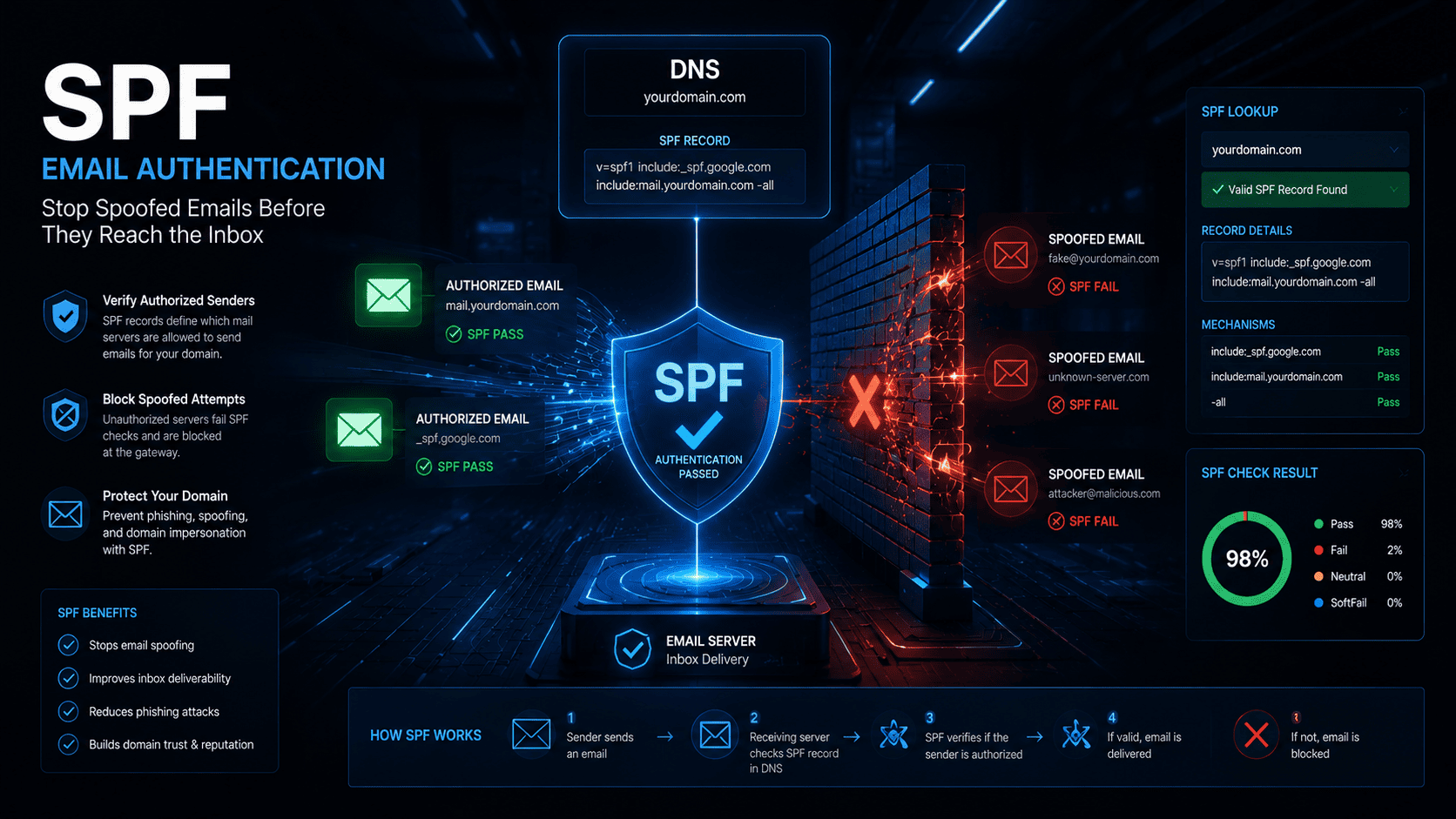
How SPF Records Stop Email Fraud
Email fraud costs businesses billions every year — and a large portion of it relies on one simple trick: pretending to send from a domain you do not own.
SPF records are one of the oldest and most effective defenses against this. They are a single DNS record that tells the world exactly which servers are allowed to send email from your domain. Any server not on that list? Suspected fraud.
This guide explains how SPF records work, how to set one up correctly, and what mistakes can quietly break your email security without you knowing.
Key Takeaways
- SPF stands for Sender Policy Framework
- It is a DNS TXT record that lists authorized sending servers for your domain
- Receiving mail servers check SPF before deciding to deliver an email
- SPF alone is not enough — it works best combined with DKIM and DMARC
- Common mistakes include hitting the 10-lookup limit and forgetting third-party senders
- An SPF failure does not automatically mean an email is rejected — DMARC decides that
What Is an SPF Record?
An SPF record is a DNS TXT record published under your domain that lists every server or service authorized to send email on your behalf. For a deep dive into the syntax, see our SPF record syntax guide.
When a receiving mail server gets an email claiming to be from you@yourdomain.com, it looks up the SPF record for yourdomain.com and checks whether the sending server's IP address appears on the authorized list.
If it does → SPF passes. If it does not → SPF fails (or soft-fails, depending on your configuration).
Definition: SPF (Sender Policy Framework) is defined in RFC 7208. It is one of the three core email authentication standards alongside DKIM and DMARC. Read our full explainer on what an SPF record is.
The Problem SPF Solves
Email was not designed with authentication in mind. The original SMTP protocol (used to send emails) has no built-in way to verify that the sender is who they claim to be.
This means anyone can technically send an email with From: ceo@yourcompany.com using any server they control. Receiving servers had no way to catch this — until SPF came along.
Without SPF, email fraud works like this:
- Attacker sets up a cheap server
- They configure it to send email as
billing@yourcompany.com - The email lands in a customer's inbox with your company name
- The customer wires money, shares credentials, or installs malware
With SPF:
- The receiving server checks: is this IP on yourdomain.com's SPF record?
- It is not
- SPF fails — and if DMARC is set to
p=reject, the email is blocked
To understand exactly how attackers exploit this, read our guide on how email spoofing works.
How SPF Works Step by Step
Step 1: You Publish an SPF Record
Your SPF record is a TXT record in DNS. It looks like this:
v=spf1 include:_spf.google.com include:sendgrid.net ip4:203.0.113.5 ~allThis record tells receiving servers: emails from your domain may come from Google's servers, SendGrid's servers, or the IP 203.0.113.5. Anything else is suspect.
Step 2: An Email Is Sent
Your mail server sends an email. The MAIL FROM command in SMTP contains the envelope sender (also called the Return-Path), which is the address SPF checks against — not the visible From: header.
Step 3: The Receiving Server Queries DNS
The receiving server extracts the domain from the envelope sender and performs a DNS lookup to find the SPF record.
Step 4: IP Address Is Checked Against the SPF Record
The receiving server compares the sending IP against every mechanism in the SPF record (ip4, ip6, include, a, mx, etc.).
Step 5: A Result Is Returned
| Result | Meaning |
|---|---|
pass |
IP is authorized. Email is likely legitimate. |
fail |
IP is not authorized. Likely fraud. |
softfail |
IP not authorized but treat gently. |
neutral |
No statement about authorization. |
none |
No SPF record found. |
temperror |
Temporary DNS error during lookup. |
permerror |
Permanent error — usually too many DNS lookups. |
Step 6: DMARC Decides What to Do
SPF returning fail does not automatically mean the email is rejected. It is an input into DMARC, which makes the final policy decision.
✅ Expert Tip: SPF without DMARC is like a smoke alarm with no sprinklers — it detects the problem but does not fix it.
This is where DMARC comes in — read our full guide on how DMARC protects your domain to see how the two work together.
SPF Record Syntax Explained
v=spf1 ip4:192.0.2.0/24 include:_spf.google.com -all| Part | What It Means |
|---|---|
v=spf1 |
Identifies this as an SPF record (required) |
ip4: |
Authorizes a specific IPv4 address or range |
ip6: |
Authorizes a specific IPv6 address or range |
include: |
Pulls in the SPF record from another domain |
a: |
Authorizes the domain's A record IP |
mx: |
Authorizes the domain's MX server IPs |
~all |
Softfail anything not listed |
-all |
Hard fail anything not listed (recommended) |
?all |
Neutral — not recommended |
+all |
Allow everything — dangerous, never use this |
The Difference Between ~all and -all
This is one of the most debated settings in SPF.
~all (softfail): Tells receiving servers the email is suspicious but should still be accepted. Most servers deliver these to the inbox or spam folder.
-all (hardfail): Tells receiving servers the email is unauthorized and should be rejected.
Which should you use? Use -all if you are confident your SPF record covers all legitimate senders. Use ~all while you are still auditing your email sending infrastructure. Once DMARC is at p=reject, the difference matters less because DMARC will enforce rejection regardless.
Common SPF Mechanisms in Practice
Using include: for Third-Party Services
Most businesses send email through multiple platforms. Each one needs to be included in your SPF record:
v=spf1 include:_spf.google.com include:sendgrid.net include:spf.protection.outlook.com -allThis authorizes:
- Google Workspace for sending
- SendGrid for transactional email
- Microsoft 365 for additional inboxes
Using ip4: for Your Own Mail Server
If you run your own mail server, add its IP directly:
v=spf1 ip4:198.51.100.25 -allThe SPF 10-Lookup Limit: A Hidden Trap
This is one of the most common — and most damaging — SPF mistakes.
SPF allows a maximum of 10 DNS lookups during validation. Each include:, a:, mx:, and exists: mechanism counts as one lookup. If your record requires more than 10, it returns a permerror — which many servers treat as a hard failure.
Why this happens: Modern businesses use many SaaS tools that each require their own SPF include. It is easy to exceed 10 lookups without realizing it.
Example of a record approaching the limit:
v=spf1
  include:_spf.google.com        ← 1 lookup (+ 2 more inside)
  include:sendgrid.net           ← 1 lookup (+ 1 more inside)
  include:spf.mailchimp.com      ← 1 lookup
  include:spf.zendesk.com        ← 1 lookup
  include:spf.hubspot.com        ← 1 lookup
  include:amazonses.com          ← 1 lookup
  include:spf.protection.outlook.com ← 1 lookup (+ 2 more inside)
  -all
This can easily exceed 10 when nested includes are counted.
Fix: Use an SPF flattening service that resolves all includes to their IP addresses and creates a single flat record with no include: lookups.
⚠️ Warning: A
permerrorfrom exceeding the lookup limit can cause your legitimate emails to fail SPF — even though you set everything up correctly. Check your lookup count with an SPF Lookup Tool.
Real-World Examples
Example 1: Google Workspace Only
v=spf1 include:_spf.google.com ~allSimple. If you send all email through Google Workspace, this is your entire SPF record.
Example 2: Multiple Providers
v=spf1 include:_spf.google.com include:sendgrid.net include:spf.mailchimp.com ip4:198.51.100.50 -allCovers Google Workspace, SendGrid (transactional), Mailchimp (marketing), and a custom server.
Example 3: Microsoft 365
v=spf1 include:spf.protection.outlook.com -allMicrosoft's official SPF include for Office 365 / Microsoft 365 senders.
Technical Breakdown: How SPF Checks Work
When a receiving server like Gmail processes an inbound email, it:
- Extracts the
Return-Path(envelope sender) domain — e.g.,yourdomain.com - Sends a DNS TXT query to
yourdomain.com - Receives your SPF record
- Walks through each mechanism from left to right
- Stops at the first matching result
- Returns the result to the delivery pipeline
This means order matters in your SPF record. Put your most common senders first to speed up evaluation.
SPF and Email Forwarding: A Known Problem
SPF has a well-known weakness with email forwarding. When an email is forwarded from one address to another, the envelope sender stays the same but the sending IP changes to the forwarder's server.
Result: SPF fails even though the email is legitimate.
This is one reason DKIM is important alongside SPF — DKIM travels with the message and survives forwarding. DMARC can pass on DKIM alignment alone even if SPF fails.
This is one reason DKIM matters so much alongside SPF — see how DKIM signing works for the full picture.
Common Mistakes With SPF Records
1. Multiple SPF Records
You can only have one SPF record per domain. If you have two TXT records starting with v=spf1, it is a permerror. Merge all your includes into one record.
2. Forgetting Third-Party Senders
Every service that sends email using your domain must be in your SPF record. This includes CRMs, helpdesks, marketing platforms, billing tools, and transactional email services.
3. Using +all
v=spf1 +all means "any server in the world is authorized to send from my domain." This completely defeats the purpose of SPF. Never use this.
4. Not Updating After Adding New Tools
Many businesses set up SPF once and forget it. Every time you add a new email tool, you must update your SPF record.
5. Relying on SPF Alone
SPF only checks the envelope sender, not the visible From: header. An attacker can pass SPF using their own domain in the envelope while showing your domain in the From: header. DMARC alignment is what catches this.
Best Practices for SPF
- Use
-allonce you are confident your record is complete - Audit your sending tools before building your SPF record
- Keep lookup count under 10 — use a flattening tool if needed
- Have one SPF record — merge all includes into a single TXT record
- Pair SPF with DKIM and DMARC — SPF alone is not sufficient
- Check your SPF record regularly with an SPF Lookup Tool
- Monitor forwarding failures — use DMARC reports to spot them
Security Risks of Weak SPF Configuration
| Weak Configuration | Risk |
|---|---|
| No SPF record | Anyone can send from your domain |
+all or ?all |
Equivalent to no protection |
| Outdated includes | Legitimate email fails; spoofing may still pass |
| Exceeding 10 lookups | Legitimate email fails with permerror |
| SPF without DMARC | Policy enforcement is missing |
Troubleshooting SPF Failures
"SPF Fail" on Legitimate Emails
Cause: The sending server's IP is not in your SPF record.
Fix: Identify the sending service and add its SPF include or IP to your record.
"SPF Permerror"
Cause: Too many DNS lookups (over 10) or two SPF records exist for the domain.
Fix: Flatten your SPF record or remove duplicate TXT records. For a full guide on this error, read our article on SPF permerror causes and fixes.
"SPF Softfail" Emails Going to Spam
Cause: You are using ~all and the sending IP is not authorized.
Fix: Either add the legitimate sender to your SPF record or investigate if the email is fraudulent.
SPF Passes But DMARC Still Fails
Cause: SPF passed on the envelope sender, but the From: domain does not align with the Return-Path domain.
Fix: Ensure your email platform uses your domain in the envelope sender, or ensure DKIM is set up and aligned.
Quick Answers
What is an SPF record and why do I need it? A DNS record that lists all servers authorized to send email from your domain. It prevents unauthorized servers from sending email pretending to be you.
How do I check my SPF record? Use a free SPF Lookup Tool and enter your domain. You will see your current record and whether it is valid.
Can I have two SPF records for the same domain? No. Two SPF records cause a permanent error (permerror). Combine all authorized senders into a single SPF TXT record.
What happens if my SPF record has too many lookups? If evaluation requires more than 10 DNS lookups, it returns a permerror. Many servers treat this as a failure, causing legitimate emails to be rejected.
Does SPF stop all email spoofing? No. SPF checks the envelope sender, not the visible From header. Attackers can pass SPF using their own domain in the envelope while showing yours in the From header. DMARC alignment is what catches this.
What is the difference between SPF softfail and hardfail? Softfail (~all) marks unauthorized senders as suspicious but still delivers. Hardfail (-all) marks them as unauthorized and recommends rejection.
Do I need SPF if I already have DKIM? Yes. SPF and DKIM check different things and DMARC needs at least one to pass and align. Using both gives better coverage.
How often should I update my SPF record? Every time you add or remove an email sending service. Review it at least once per quarter.
Conclusion
SPF is a foundational piece of your email security stack. Without it, your domain is an easy target for spoofing and fraud. With it properly configured and paired with DKIM and DMARC, you create a strong authentication chain that blocks the vast majority of email fraud attempts.
Take 15 minutes today to check your SPF record, audit your sending sources, and confirm you are covered.
Check Your SPF Record Now
Use our free SPF Lookup Tool to see exactly what your SPF record says and whether it is configured correctly. Want to review all your email authentication records at once? Use the DNS Records Checker. You can also run a TXT Record Lookup to view your raw SPF record directly from DNS. New to DNS? Our guide to understanding DNS records is a great starting point.